Finally that crazy S tube sound, back on your PC.
Miss the tube effect from Galaxy S8 and S9 phones? Amp S Again is an independent audio effect for Windows, tuned by side-by-side measurements against the phone's effect. Rounder bass, softer highs, on everything you play.
See it, hear it, in under three minutes.
Headphones on, and switch off Amp S Again and any other sound effect while you watch.
Galaxy owners keep asking for it back.
About 125 million Galaxy phones shipped with Tube Amp Pro. It is gone from the sound settings of every newer model, and on Samsung's own forums owners still ask where it went and why.
Counted on Oct 9, 2026 on Samsung's community forums in 26 countries, Reddit, XDA, Android Central and Clien; only threads naming Tube Amp Pro, plus 46 more Reddit comments (88 other threads ask for SoundAlive in general). Samsung's Korean audio team confirmed it was dropped from the S10 and Note10 onward to simplify features and save memory. Click a card to open the thread.
Phones: estimate of about 125 million units (range 110–140 million) over each model's full life. Samsung does not publish per-model totals; first-year figures come from Samsung statements and analysts (S8 series ≈41 M in 2017, S9 series 10.2 M in its first quarter, Note8 11–12 M forecast for 2017 by Counterpoint, Note9 target 12 M), extended to full life with the S7's ratio (≈48 M in year one, ≈70 M later). These are shipments, not active users.
Hear all three. Same song, one switch.
Same song in. Two effects out. Compared side by side.
We play the same recording through the Galaxy S8/S9 tube effect and through Amp S Again, align both outputs to the sample, and compare them. Every chart below uses the "Sax & Guitar" song from the player above.
One kick drum, up close
60 milliseconds of the actual waveform, from the excerpt you can play. The flat sound goes its own way; Amp S Again stays on the S8/S9's line through every swing.
Drag across the waveform to zoom in · the vertical scale follows the zoom · double-click to zoom back out.
How we measured: identical music goes into both effects; outputs are aligned to the sample. Amp S Again contains no Samsung code.
Built for everyday listening.
Every app, every sound
Spotify, YouTube, games and your browser. Amp S Again processes everything Windows plays, with nothing to set up per app.
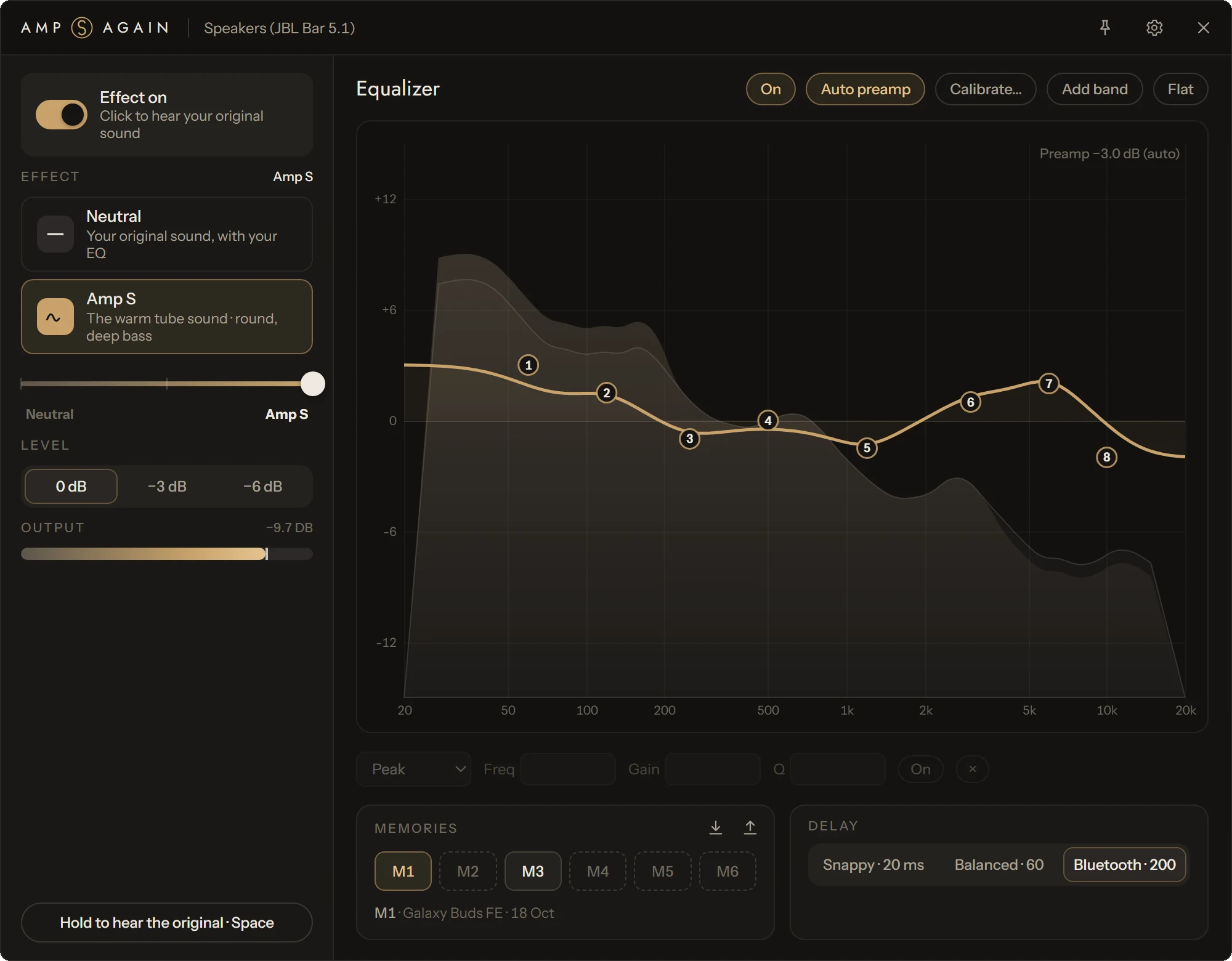
Parametric EQ you can drag
Up to sixteen bands you move with the mouse, Q on the scroll wheel. Each speaker and headset remembers its own curve.
Steady on Bluetooth
Built-in clock-drift correction keeps wireless headphones playing smoothly, without the hiccups of Windows' own rate adjustment.
Volume keys just work
The Windows volume slider and your keyboard keys still control your real speakers, after the effect.
One click on, one click off
A small icon in the system tray opens the panel. Turn the effect off, or hold a button to compare with your plain sound.
Your settings stay put
Updates and reinstalls keep your EQ curves, levels and favourite outputs exactly as you left them.
Set the amount of tube
A slider sets how much of the original tube effect goes into your sound, from a light touch to the full effect.
Tuned to your room
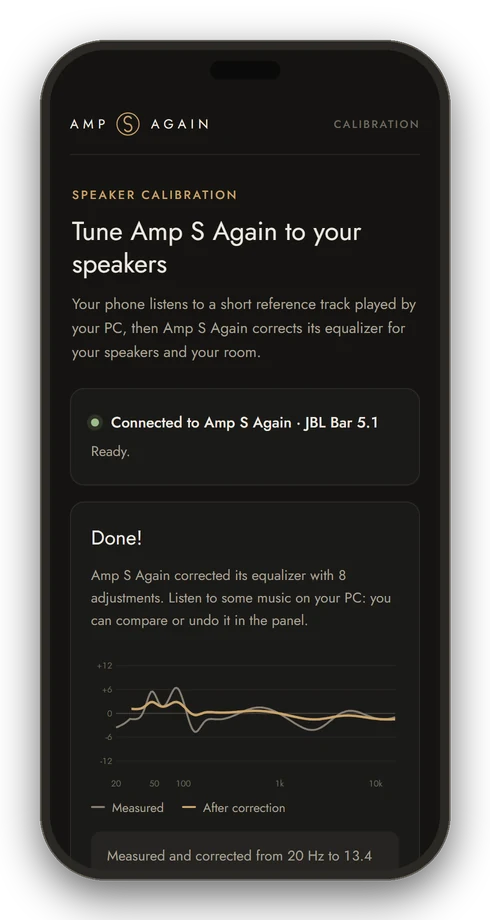
Scan a QR code: your phone listens to a 40-second reference track and Amp S Again corrects its equalizer for your speakers and your room.
Six memories
Hold M1 to M6 to store an equalizer curve, press to recall it. Export and import your curves as files.
Your phone tunes it to your room.
Every room colours the sound: bass that booms in one corner, highs lost in the curtains. Scan a QR code and your phone listens to a 40-second reference track, a guitar over gentle ocean waves. Amp S Again then corrects its equalizer for your speakers and the place you listen, down to 20 Hz.
- ScanOpen Calibrate in the panel and scan the QR code. No app to install, no microphone to buy.
- ListenHold your phone where you sit. The reference track plays for 40 seconds, then your music comes back.
- EnjoyThe correction applies at once. Measure up to three spots for an even smoother result, or undo it in one click.
The sound is analysed on your phone and never recorded or sent: only frequency curves reach your PC.
Want more bite? Switch to Amp S Drive.
Amp S recreates the Galaxy S8's Tube Amp Pro. Amp S Drive is its companion for when you want more edge: the same deep bass, clearer low-mids and real tube saturation on the bass notes. Switch from the tray icon or the panel, and set each one anywhere from 0 to 100 %.
Both versions play at the same loudness, so you hear the character, not the volume. Switch while it plays.
Install, pick your output, press play.
Install Amp S Again
Get it from the Microsoft Store. No driver to install: it works with whatever output Windows uses.
Listen where you like
Speakers, soundbar or Bluetooth headphones: pick them in Windows as usual, the effect follows.
Play anything
The sound warms up right away. Hold one button, or Space, to hear your plain sound.
Hear it on your own music.
Install Amp S Again and try the full tube effect on everything your PC plays.
Amp S Again for Windows
- The full tube effect and the parametric equalizer
- Works with every app: Spotify, YouTube, games, browsers
- 3 hours of the full effect for free, then a free version that goes up to 25 %
- No account needed
Free on the Microsoft Store for Windows 10 & 11: installs in one click and updates itself. No driver to install: it works on any output, your PC speakers included, follows the output you choose in Windows and keeps your usual volume keys.
Good to know.
Is Amp S Again made by Samsung?
No. Amp S Again is an independent product. It is not affiliated with, endorsed by or sponsored by Samsung Electronics. We compare it with the Galaxy S8/S9's tube effect because many listeners miss that sound.
Does Amp S Again contain any Samsung code?
No. Amp S Again is written from scratch and tuned with measurements of how the phone's effect changes real music.
What do I need?
A 64-bit Windows 10 or 11 PC. There is no driver to install: Amp S Again works with whatever output Windows uses, your PC speakers included.
Does it work with Bluetooth headphones?
Yes. Choose your headphones in Windows as usual and the effect follows. Each output keeps its own equalizer curve and level, so switching between headphones and speakers needs no re-tuning.
Will videos stay in sync?
Amp S Again adds about a tenth of a second of delay with the standard buffer, which is usually unnoticeable in videos. If lips and sound drift apart, free browser extensions fix it by shifting the picture to match the sound. We use LagSync (Chrome and Firefox), which works on YouTube, Netflix and most web videos. Bluetooth Video Sync and Audio Bluetooth Sync are alternatives. A longer buffer is also available for difficult Bluetooth connections.
Can I switch it off?
Any time, with one click on the tray icon. Your sound then goes straight to your speakers.